.svg)

Brief
Properly engineered ChatGPT prompts can help lawyers and legal teams automate in-house counsel workflows, from contract review to legal request intake to matter management. Though ChatGPT can be a strong starting point, in-house teams should eventually evaluate a purpose-built legal AI platform such as LegalOn, which guarantees Day 1 productivity. No prompt engineering required.
For additional rigorously engineered ChatGPT prompts for legal use, download our complimentary guide: How to Build an AI Prompt Library for Your Legal Team.
With the increasing demands of a typical legal workday, in-house teams are turning to AI to keep pace and automate their most time-consuming tasks: contract review, matter tracking, policy drafts, and board prep, to name a few.
OpenAI’s ChatGPT is a strong option, but using the right legal prompts—and engineering them to produce accurate, legally sound results—can be challenging.
I worked with the LegalOn legal engineering team to compile 12 ChatGPT prompts lawyers can use to expedite common legal workflows.
Disclaimer: Always review AI-generated output before it goes to a counterparty, a business partner, or leadership. Never paste confidential information, client data, or non-public deal terms into a public AI tool unless your organization has an enterprise agreement with explicit data protection terms in place. Outputs from AI models should not be considered final as they can and do produce inaccurate output, including fabricated citations and misstatements of law. Treat every response as a first draft that requires attorney review.
If you’d like AI-powered, attorney-vetted outputs you can trust from Day 1, book a demo with LegalOn, the AI productivity platform for in-house legal teams. Book a demo →
What can in-house legal teams automate with ChatGPT? The answer is anything that only requires a document upload and a prompt. However, there is an important caveat: ChatGPT can automate the first pass of a contract or the first draft, but every output must be rigorously checked for accuracy and compliance.
Here are the top use cases to start with
Without question, the highest-volume task for most in-house teams is contract review. Luckily, it’s also the one where AI delivers the fastest return.
ChatGPT can scan commercial agreements for common risk patterns, summarize key terms, and compare versions of clauses, reducing the time you spend on a first-pass review before attorney judgment takes over.
That said, a dedicated contract review tool is a much stronger and more trustworthy alternative. My team compared LegalOn to 11 AI models—including ChatGPT-5.5 and ChatGPT 5.4-mini— across more than 3,000 head-to-head reviews and 21 provisions.
We used an independent LLM judge that was blind to the origin of each review. The results were clear:
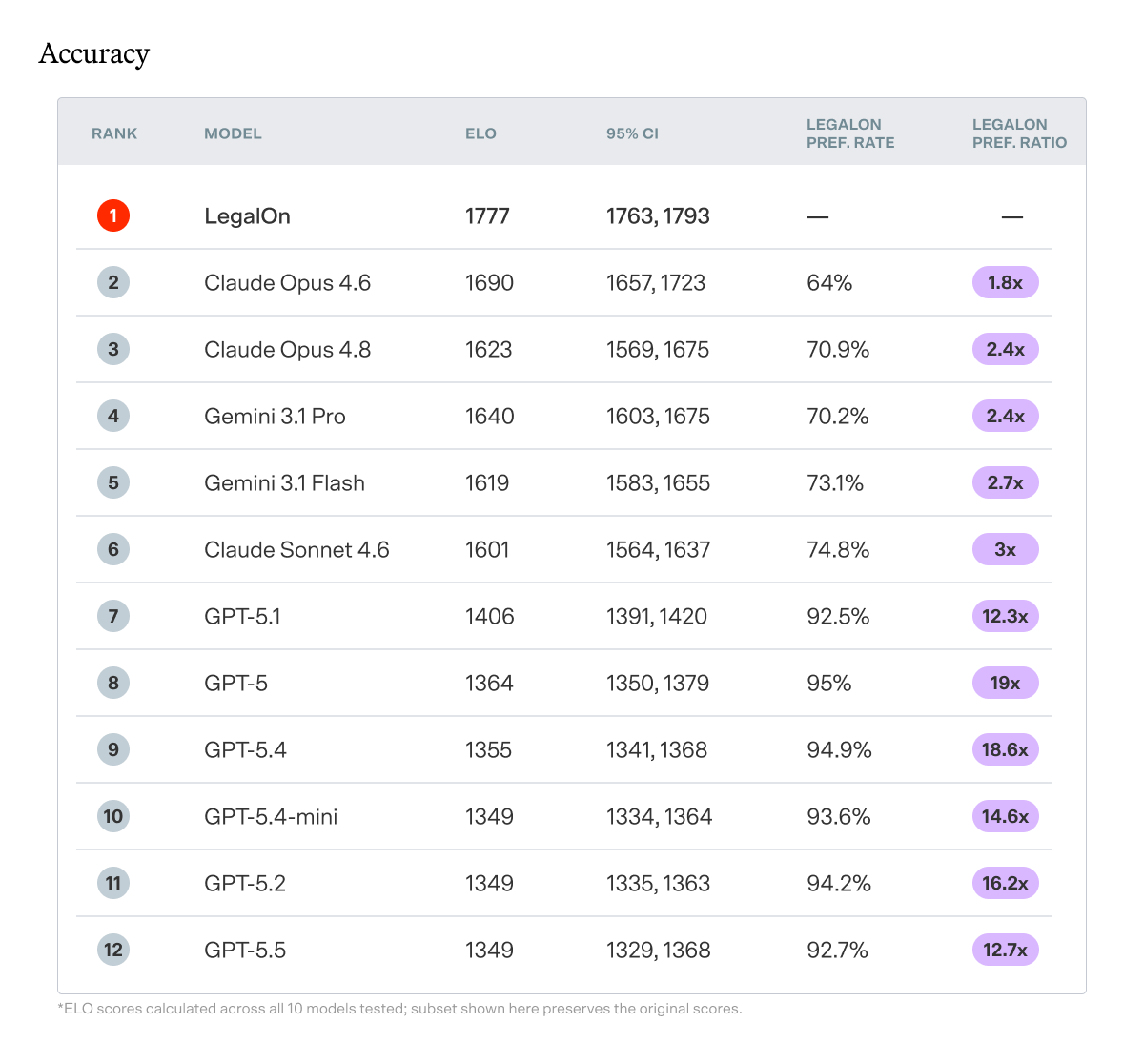
The data is clear: ChatGPT can be a strong option for contract review, but it should never be an in-house team’s sole option.
The problem is not whether GPT models are intelligent. It’s whether a general-purpose model, prompted in a single pass, can reliably verify whether a clause meets a standard.
A purpose-built contract review tool such as LegalOn fills this gap. With 50+ attorney-vetted playbooks and built-in legal intelligence, it’s the best choice for automating contract review from Day 1 with high accuracy and reliability.
Ad hoc requests from Sales, HR, Finance, and Procurement consume hours that rarely show up in any metrics. The right ChatGPT prompts can help you draft self-service guidance, triage incoming requests by complexity, and create internal FAQs that reduce low-value volume before it reaches your queue.
From NDAs to data processing addenda to internal AI use policies, ChatGPT can help produce structured first drafts that you can refine rather than create from scratch.
Its primary limitation is that it doesn’t work from your existing positions. For drafting contracts more efficiently and accurately, you’ll want to use a tool with pre-built, attorney-vetted playbooks or the option to build your own.
Status updates, general counsel dashboards, and quarterly metrics reports are time-consuming to write and easy to automate. This is one of my favorite legal use cases for ChatGPT because it’s relatively low-risk but high-reward.
When a new regulation drops, your business partners need a plain-English explanation. ChatGPT and similar general-purpose AI tools are well-suited to translating regulatory text into business-ready summaries. Just make sure it goes through human review before it goes out.
Download our complimentary guide: How to Build an AI Prompt Library for Your Legal Team
You don’t need to take a prompt engineering course to write effective legal prompts for ChatGPT, but I would recommend abiding by the following principles:
1. Set the role. Tell the AI who it is and what it's doing. "You are a senior in-house attorney at a technology company reviewing a vendor MSA" will return a fundamentally different output than an un-contextualized request. The more specific the role, the more useful the response.
2. Specify the jurisdiction and governing law. Legal standards vary, sometimes dramatically. A limitation of liability clause that's market in Delaware may be unenforceable in California. Always tell the AI where you are and what law governs.
3. Define the output format. Do you want a redlined clause, a plain-English risk summary, a bullet list for your CFO, or a full first draft? AI will make its own formatting choices if you don't make them first. Be explicit about what you need and who will read it.
4. Never paste confidential information into a public AI tool. This is required. Use anonymized or fictional contract data for any prompt-based work unless your organization has an enterprise agreement with explicit data protection terms.
What this looks like:
Instead of: "Review this indemnification clause."
Try: "You are a senior in-house attorney at a SaaS company reviewing a vendor MSA governed by New York law. Review the following indemnification clause from the vendor's perspective. Identify any provisions that are unusually broad or one-sided against the customer, explain the risk in plain English, and suggest revised language. Format your response as a short risk summary followed by a tracked-changes redline."
Most guides to ChatGPT prompts for lawyers were written with law firms in mind, covering client intake, billable hour tracking, and litigation research. If you're in-house counsel, that's not your world.
The prompts below are built specifically for common workflows in a legal team’s workday. I’ve tested each one and identified where they excel, and where a legal AI tool like LegalOn can take you further.
Unless otherwise included, add the following closed-book rule at the top of every prompt, exactly as written. It ensures the model frames the entire task through a risk-aware, attorney-support lens before reading the instructions.
“SYSTEM CONSTRAINTS (apply to this entire task): You are executing this task as a senior in-house corporate counsel. Your output is an internal legal workflow aid and does not constitute formal legal advice. Operate under a closed-book assumption: rely only on the text explicitly provided in this prompt. If a legal conclusion or drafting requirement depends on missing facts, jurisdiction-specific nuances, or business judgment calls, do not guess — leave a bracketed placeholder and flag the gap in a dedicated notes section. Note that AI outputs may reflect training data biases toward common contract positions that may not reflect this company's actual negotiating leverage, industry norms, or specific circumstances — attorney review is required before relying on any suggested positions.”
Second, be sure to personalize each prompt to your specific role, governing jurisdiction, and industry.
Finally, vet every output, and never upload sensitive data into a public AI tool.
Our guide, How to Build an AI Prompt Library for Your Legal Team, includes 5 additional powerful ChatGPT prompts engineered by our AI team for in-house legal use cases.
“You are a senior in-house attorney at a [industry] company reviewing an inbound vendor MSA governed by [State] law. The counterparty is incorporated and primarily operates in [counterparty jurisdiction — if unknown, flag this as a gap]. Assume our company is the customer unless otherwise stated. I will paste key commercial provisions below.
Identify the top five legal or business risks from the customer's perspective. For each risk, cite the relevant clause reference or quoted language, explain the issue in plain English, and suggest a preferred fallback position.
Do not identify a risk unless it is supported by the text provided. If important context is missing, note the missing information rather than assuming it. Note that the suggested fallback positions are starting points for attorney review only — do not use them in negotiations without attorney approval.
IMPORTANT — MISSING PROTECTIONS: In addition to risks found in the text, explicitly identify any standard customer protections that are entirely absent from the provisions provided (e.g., no mutual termination right, no limitation of liability cap, no IP ownership clause). A missing protection is often a greater risk than an unfavorable clause. Flag each absence in the Risk column with the label "MISSING PROTECTION."
Format your response as a table with five columns: Clause (or "MISSING" if absent), Risk, Why It Matters, Preferred Fallback Position (for attorney review), Missing Information or Assumptions.
This is for internal legal workflow support only and is not a substitute for attorney review or final legal advice. Flag any jurisdiction-specific issues, business judgment calls, company policy questions, or areas where outside counsel review may be appropriate.
Here are the provisions: [paste provisions].”
What it does well: ChatGPT surfaces obvious risks such as one-sided indemnification, uncapped liability, and auto-renewal traps, and correctly flags standard customer protections that are entirely missing from the text.
Where it falls short: ChatGPT doesn't know your playbook. It will flag issues generically, not against your organization's pre-approved fallback positions. You'll still need to manually reconcile the output with your standards.
How it compares to a purpose-built legal AI tool: LegalOn automatically reviews contracts against your attorney-built playbooks, flagging issues, and generating redlines grounded in your organization's preferred language.
“You are a senior in-house attorney. Compare the following two versions of a limitation of liability clause in a commercial agreement governed by [State] law. Note that the counterparty is located in [counterparty jurisdiction — if unknown, flag as a gap], which may affect enforceability analysis.
Identify every material difference between the two versions. For each difference, explain which version is more favorable to the customer, why it matters legally or commercially, and what a reasonable fallback position would be for attorney review.
Base your comparison only on the provided clause text. Do not infer differences that are not supported by the text. If the impact depends on other provisions, such as indemnity, data security, confidentiality, payment obligations, or insurance, identify that dependency.
Format your response as a side-by-side comparison table with the following columns: Issue, Version 1, Version 2, Customer-Favorable Version, Why It Matters, Reasonable Fallback (for attorney review), Related Provisions to Check.
This is for internal legal workflow support only and is not a substitute for attorney review or final legal advice. Flag any jurisdiction-specific issues, business judgment calls, company policy questions, or areas where outside counsel review may be appropriate.
Version 1: [paste clause]
Version 2: [paste clause].”
What it does well: ChatGPT produces a detailed side-by-side analysis of two clause versions, correctly identifying which is more favorable and flagging dependencies on related provisions like indemnity and confidentiality.
Where it falls short: Without your negotiating history and playbook, the "reasonable fallback" suggestions reflect generic market practice rather than positions your organization has actually accepted or rejected in prior deals.
How it compares to a purpose-built legal AI tool: LegalOn compares inbound language directly against your approved standards and automatically generates redlines, eliminating the manual reconciliation step.
“You are a senior in-house attorney at a [industry] company. Summarize the following contract provisions for a non-legal business audience.
Use plain English. Flag the three highest-risk provisions, explain in one sentence why each matters to the business, and recommend a practical next step for each. Keep the total summary under 300 words.
Plain English requirement: Do not use legal terms such as "indemnity," "aggregate liability," "derivative works," "unmodified," "tort," or similar without first explaining them in plain English in the same sentence. If you cannot explain a concept without legal jargon in the space available, describe the business consequence instead. For example, instead of "the indemnification clause is one-sided," write "if someone sues because of how this software was used, we pay the vendor's legal bills — but they don't cover ours in most situations."
When separating business risk from legal risk, apply these definitions consistently and label every risk explicitly — do not leave any risk unlabeled:
BUSINESS RISK: A provision that could result in financial loss, operational disruption, reputational harm, or loss of strategic flexibility — even if it is technically enforceable.
LEGAL RISK: A provision that may be unenforceable, create regulatory exposure, violate applicable law, or expose the company to litigation or liability.
A single provision can carry both types of risk — flag both where applicable.
Do not include legal citations or defined terms without explanation. Do not assume facts not included in the provisions. If a risk depends on missing context, say so clearly. Note that the recommended next steps are preliminary observations for Legal review — business teams should not act on them without confirmation from Legal.
Use the following structure:
Brief Overview (3 sentences maximum)
Top Three Risks (label each explicitly as Business Risk, Legal Risk, or Both — no unlabeled risks)
Recommended Next Steps (subject to Legal review — write each step as a plain-English action, not a legal instruction)
This is for internal legal workflow support only and is not a substitute for attorney review or final legal advice. Flag any jurisdiction-specific issues, business judgment calls, company policy questions, or areas where outside counsel review may be appropriate.
Here are the provisions: [paste provisions]”
What it does well: ChatGPT can translate legal risk into plain English for a business audience, correctly labeling each issue as a business risk, legal risk, or both, and keeping the output within a tight word limit.
Where it falls short: Without explicit instructions, the model defaults to legal register even when asked to write for non-lawyers, requiring additional prompt engineering to produce output a VP or CFO can actually use without a translator.
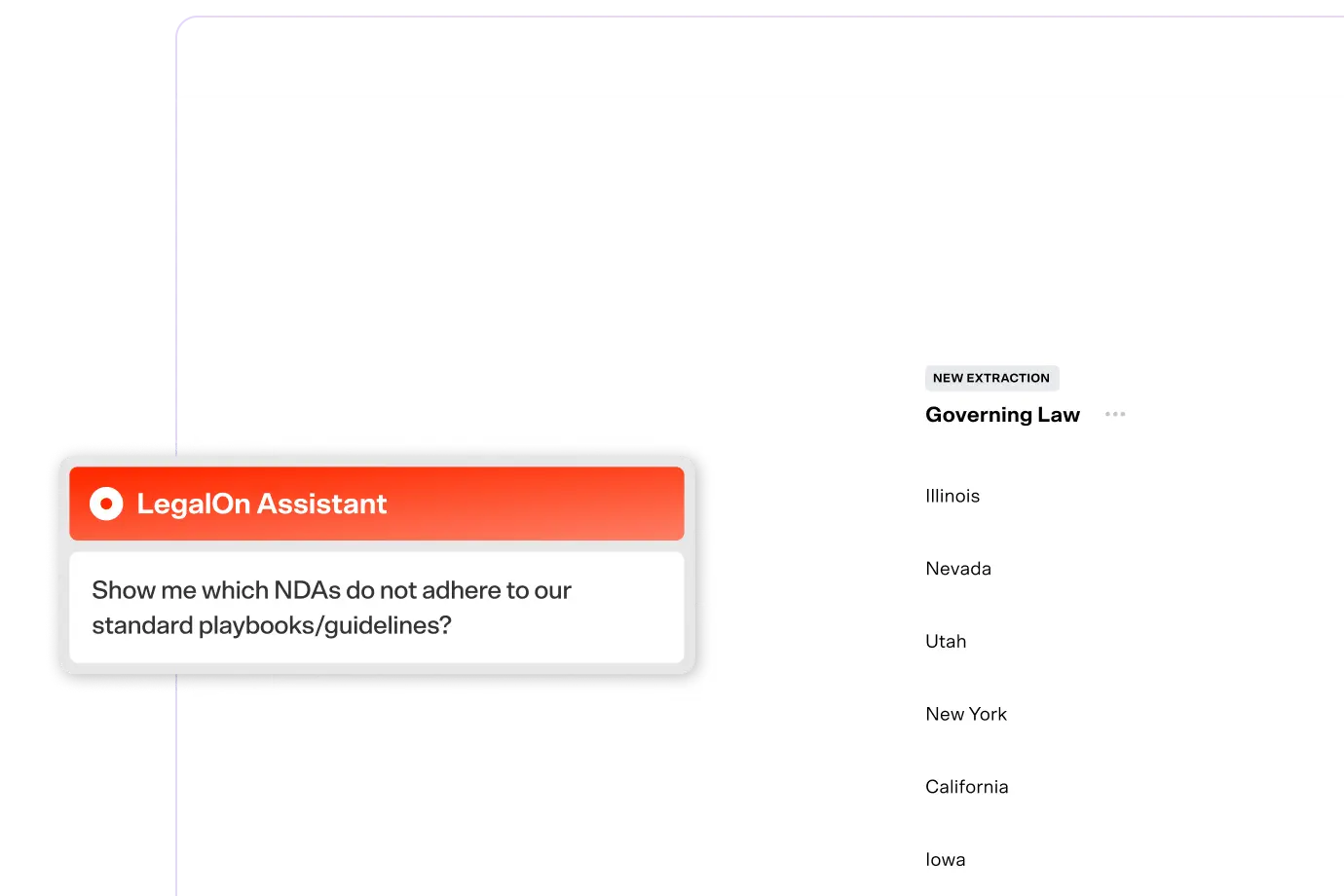
How it compares to a purpose-built legal AI tool: LegalOn Assistant can answer business-specific questions about a contract in real time, with language calibrated to your industry and your standards.
"You are an experienced in-house attorney at a [industry] company with a legal team of [team size — e.g. 'two attorneys' or 'unknown']. I will describe an incoming legal request from an internal business team.
Respond in the following structured card format only — no tables, no additional prose, no extra sections:
TYPE: [classify as one or more of: contract review / policy question / compliance question / deal negotiation / dispute or escalation / employment-related / privacy or data security / intellectual property / general advice]
COMPLEXITY: [Low / Medium / High — add '(provisional)' if key documents are missing that would change this rating, and name the single condition that would upgrade it]
OWNER: [name the appropriate owner based on the team size provided; do not invent org chart roles that don't exist in a small team; if team size is unknown, say 'confirm with GC']
NEXT STEP: [one sentence — the single most important action Legal should take in the next 24 hours]
HOLD: [one ready-to-send sentence in first person that acknowledges the request and sets expectations while Legal assesses — keep it under 30 words]
---
TOP 3 GAPS: [bullet list of the three most critical pieces of missing information that must be resolved before Legal can properly assess or route this request — no more than three, prioritized by importance]
Do not add any text outside this format. Do not include reasoning paragraphs, additional columns, or extended analysis. Urgency and escalation decisions are attorney judgment calls — this card is a routing aid only. This is for internal legal workflow support only and is not a substitute for attorney review or final legal advice. Flag any jurisdiction-specific issues, business judgment calls, company policy questions, or areas where outside counsel review may be appropriate.
Here is the request: [paste anonymized request description].”
What it does well: ChatGPT correctly classifies multi-issue requests, applies provisional complexity ratings, and generates a ready-to-send holding response, reducing the time between intake and first attorney action.
Where it falls short: It can't log the request, assign it, set a deadline, or track it to completion. The output cannot account for the current attorney workload, matter-priority queues, or internal escalation protocols.
How it compares to a purpose-built legal AI tool: LegalOn's Matter Management centralizes all legal requests in one place, with intake forms, assignment, status tracking, and deadline visibility across your entire portfolio.
“You are an in-house attorney at a [industry] company operating under [State] law. Draft a plain-English FAQ for our Procurement team explaining when they must involve Legal before signing a vendor contract.
Use placeholders in brackets for company-specific thresholds, approval rules, and escalation paths unless I provide them. Do not invent dollar thresholds, contract types, or internal approval requirements.
IMPORTANT FORMATTING REQUIREMENT: Every placeholder must appear in bold brackets, such as [DOLLAR THRESHOLD — CONFIRM WITH LEGAL]. At the end of the FAQ, include a clearly labeled section titled "Items That Must Be Confirmed Before Distribution" listing every placeholder that requires company-specific input. This FAQ must not be distributed until all items on that list are resolved and Legal has approved the final version.
Cover:
- Dollar thresholds that trigger Legal review
- Contract types that always require Legal sign-off
- Data, privacy, security, AI, or confidential information issues that escalate urgency
- Non-standard terms that should be flagged
- What information to include when submitting a request
- What Procurement should not sign without Legal approval
Use a Q&A format with 5–7 questions and short, direct answers.
Flag any provisions that may require review by Legal Operations, Privacy, Security, Finance, HR, or outside counsel. This is for internal legal workflow support only and is not a substitute for attorney review or final legal advice. Flag any jurisdiction-specific issues, business judgment calls, company policy questions, or areas where outside counsel review may be appropriate.
Known company rules or thresholds: [insert rules or write 'not provided'].”
What it does well: ChatGPT produces a structurally complete FAQ with every company-specific threshold clearly flagged as a placeholder. Once complete, this kind of proactive self-service content reduces the volume of low-value requests and frees up attorney time for higher-complexity work.
Where it falls short: The FAQ exists in a document. It doesn't integrate with your intake workflow, so the guidance and submission process remain disconnected.
How it compares to a purpose-built legal AI tool: LegalOn Knowledge Core allows you to access your contracts, playbooks, and matter history in one place, reducing the number of placeholders that require manual completion.
Our guide, How to Build an AI Prompt Library for Your Legal Team, includes 5 additional powerful ChatGPT prompts engineered by our AI team for in-house legal use cases.
Tracking legal work is a perennial challenge for in-house teams. These prompts help with the administrative overhead of managing open matters, reporting to leadership, and maintaining institutional knowledge.
“You are an in-house attorney. Using the matter details below, draft a concise status update for the General Counsel.
Structure it in three short paragraphs:
1. Current status and background
2. Key risks and open issues
3. Next steps and expected resolution timeline
Keep the total update under 250 words. Use a clear, professional tone. Do not add facts that are not included in the matter details. If the expected timeline is unclear, say that the timeline is pending attorney confirmation rather than estimating one.
Flag any issues that may require executive escalation, outside counsel input, or cross-functional follow-up. This is for internal legal workflow support only and is not a substitute for attorney review or final legal advice. Flag any jurisdiction-specific issues, business judgment calls, company policy questions, or areas where outside counsel review may be appropriate.
Here are the matter details (include counterparty jurisdiction if relevant): [paste anonymized matter details].”
What it does well: ChatGPT produces a concise, professionally toned GC update that correctly refuses to invent timelines when facts are unclear, and flags cross-functional escalation needs. This is a genuine time-saver, especially when you're managing 20+ open matters simultaneously.
Where it falls short: Output quality is entirely dependent on the quality of the matter details provided. You have to maintain the matter details manually and paste them in each time. There's no single source of truth.
How it compares to a purpose-built legal AI tool: LegalOn's Matter Management tracks every matter from intake to close, with status updates, assignees, due dates, and department context all in one place. Your GC sees the full picture without anyone having to write a status email.
“You are an in-house attorney preparing a quarterly report for the General Counsel.
IMPORTANT — DO NOT PERFORM MATHEMATICAL OPERATIONS: LLMs are unreliable at arithmetic. Do not calculate, aggregate, or verify any numbers. I have provided pre-calculated totals and averages below; use these metrics only as given to draft the narrative sections.
Using the pre-calculated data provided, write:
1. Executive Summary (150 words or fewer): A plain-English summary of the team's performance this quarter based solely on the metrics provided.
2. Metrics Table: Reformat the data I provide into a clean table. Do not add, derive, or change any figures.
3. Data Quality Notes: Flag any metrics I have provided that appear inconsistent, incomplete, or ambiguous — note the issue and what additional information would be needed to clarify.
4. Patterns for Leadership (qualitative observations only): Identify two or three narrative patterns suggested by the data. Do not infer root causes. Label these as observations, not conclusions, and note that management review is required before acting on them.
Do not invent numbers, round figures, or fill in gaps in the data. If a metric is missing, flag it as missing.
This is for internal legal workflow support only and is not a substitute for attorney review or final legal advice. Flag any jurisdiction-specific issues, business judgment calls, company policy questions, or areas where outside counsel review may be appropriate.
Pre-calculated metrics and matter data: [paste pre-calculated totals, averages, and anonymized matter data].”
What it does well: If you have the data in a clean format, ChatGPT can synthesize it into a readable report. It correctly refuses to perform arithmetic, produces clean narrative sections from pre-calculated inputs, and flags data quality issues — including ambiguous denominators and missing baselines — before they become presentation problems.
Where it falls short: The model cannot pull, aggregate, or validate data from any system — all calculations must be done externally first, making this a drafting aid rather than a true reporting tool.
How it compares to a purpose-built legal AI tool: LegalOn's Matter Management captures matter data automatically, so your reporting reflects reality, not whatever you happened to document.
From NDAs to SOWs to policy documents, in-house teams constantly draft. These prompts resolve the blank-page problem.
"SYSTEM CONSTRAINTS (template drafting — modified): You are executing this task as a senior in-house corporate counsel. Your output is a first draft for attorney review and does not constitute final legal advice or a finalized agreement. For this drafting task only, you may draw on your training data for standard legal boilerplate phrasing. However, you must NOT assume any company-specific business terms, durations, liability caps, approved tools, or internal policies — use bracketed placeholders for all variable business inputs. Flag every placeholder in a notes section at the end. Note that this draft reflects common market positions and may not align with this company's preferred playbook — attorney review and playbook alignment are required before use.
You are a senior in-house attorney. Draft a mutual non-disclosure agreement governed by [State] law for use between a technology company and a third-party vendor incorporated or primarily operating in [counterparty jurisdiction — if unknown, flag as a gap and note that enforceability analysis may be incomplete].
Include provisions for:
- Definition of confidential information
- Standard exclusions
- Obligations of the receiving party
- Permitted disclosures
- Compelled disclosures
- Confidentiality period
- A two-year agreement term
- Return or destruction of materials upon request
- No license or ownership transfer
- Equitable relief, if appropriate under the governing law
- No obligation to proceed with a transaction
- Governing law and venue placeholders
Flag any provisions where you recommend further negotiation or company-specific customization, including confidentiality duration, residual knowledge, affiliates, injunctive relief, data security, export controls, privacy, and treatment of highly sensitive information. Also flag any provisions where the counterparty's jurisdiction may affect enforceability.
At the end, provide a bracketed placeholder index listing every variable term that requires company input before this draft can be finalized.
This is for internal legal workflow support only and is not a substitute for attorney review or final legal advice.
Company-specific NDA positions, if any: [insert positions or write 'not provided'].”
What it does well: ChatGPT produces a structurally complete first draft with appropriate placeholders, correctly adds industry-specific provisions not explicitly requested, and flags enforceability considerations based on counterparty jurisdiction.
Where it falls short: The draft reflects common market positions rather than your organization's preferred NDA playbook. Every substantive position requires attorney review and playbook alignment before the document is ready for use in a real negotiation.
How it compares to a purpose-built legal AI tool: LegalOn Review can help generate NDAs and other templates directly from your organization's approved language, producing a playbook-aligned first draft rather than a generic market-standard one.
"SYSTEM CONSTRAINTS (template drafting — modified): You are executing this task as a senior privacy attorney. Your output is a first draft for attorney and privacy counsel review and does not constitute final legal advice or a finalized agreement. For this drafting task only, you may draw on your training data for standard DPA boilerplate. However, you must NOT assume any company-specific business terms, processing purposes, data categories, approved subprocessors, or liability positions — use bracketed placeholders for all variable inputs.
CRITICAL — TRANSFER MECHANISMS: Do not assume which international data transfer mechanism currently applies (e.g., do not assert that Standard Contractual Clauses, adequacy decisions, or any other framework is currently valid without noting that regulatory status must be verified). Use bracketed placeholders for all transfer mechanism names and flag each one for outside privacy counsel to confirm against current regulatory guidance. Do not reference Privacy Shield — it was invalidated. The current EU-U.S. framework is the Data Privacy Framework (DPF), but its status should be independently verified before reliance.
You are a privacy attorney with expertise in GDPR, CCPA/CPRA, and SaaS vendor agreements. Draft a data processing addendum for inclusion as an exhibit to a SaaS vendor agreement governed by [State/Country] law.
The customer is the data controller or business, and the vendor is the data processor or service provider, unless otherwise stated. The vendor is located in [vendor jurisdiction]. Data subjects are primarily located in [data subject jurisdictions — list all that apply].
Include provisions covering:
- Scope and purpose of processing
- Categories of personal data and data subjects
- Processing instructions
- Confidentiality obligations
- Security measures
- Subprocessor restrictions and approval rights
- International data transfers, if applicable
- Data breach notification, including a 72-hour outer limit where appropriate
- Data subject rights assistance
- Regulatory inquiry assistance
- Audit rights or security documentation
- Return or deletion of data upon termination
- Assistance with data protection impact assessments, if applicable
- Order of precedence with the main agreement
Flag any provisions that may require jurisdiction-specific customization, including GDPR Article 28 requirements, CCPA/CPRA service provider terms, cross-border transfer mechanisms, sensitive personal information, sector-specific rules, and local breach notification laws.
Before the draft, provide a short list of information needed to finalize the DPA, including all transfer mechanism placeholders that require regulatory verification.
This is for internal legal workflow support only and is not a substitute for privacy counsel review, attorney review, or final legal advice.
Applicable jurisdictions, data types, and transfer details: [insert details or write 'not provided'].”
What it does well: Produces a comprehensive multi-jurisdiction DPA with correctly structured transfer mechanism placeholders, appropriate regulatory uncertainty flags, and a standalone HIPAA determination checklist that prevents reliance on assumptions.
Where it falls short: The subprocessor schedule and liability section are intentionally left as placeholders. Both require significant input from attorneys and privacy counsel before the document is ready for negotiation, meaning the hardest parts of the DPA remain manual.
How it compares to a purpose-built legal AI tool: LegalOn Review flags data processing obligations as a distinct issue category, so you never miss a privacy gap in an incoming agreement, even when it's buried in an exhibit.
In-house counsel increasingly owns compliance programs, policy governance, and employee-facing guidance. These prompts address that workload.
“You are a senior in-house attorney. Summarize [regulation name] for a non-legal business audience in under 400 words.
Use only the regulation text, official guidance, or source materials I provide. If I do not provide source materials, explain what source materials are needed and provide a general framework only — do not present general framework content as confirmed regulatory requirements.
Note that this company operates in [jurisdiction(s)] and the counterparty or affected operations are located in [relevant locations], which should inform which provisions are most relevant.
Cover:
- What the regulation requires
- Which business functions or teams it affects
- Key compliance deadlines
- Consequences of non-compliance
- Practical next steps
- Areas of ambiguity or uncertainty (flag these clearly — they require regulator guidance or outside counsel input before the company acts, not just internal review)
Do not assume the reader has a legal background. Do not provide legal citations unless they are necessary, and explain any legal terminology in plain English.
This is for internal legal workflow support only and is not a substitute for attorney review or final legal advice. Flag any jurisdiction-specific issues, business judgment calls, company policy questions, or areas where outside counsel review may be appropriate.
Source materials: [paste regulation text, official guidance, or summary materials].”
What it does well: ChatGPT correctly refuses to summarize a regulation without source materials, instead producing a structured gap analysis. This prevents it from creating a confident-sounding AI summary of a rule the model may have outdated or incomplete training data on.
Where it falls short: ChatGPT's knowledge is limited by its training cutoff. Providing source materials is entirely the user's responsibility; the prompt cannot retrieve, verify, or update regulatory text, meaning the output is only as current as what the attorney pastes in.
A note on Claude for Legal: For long-form regulatory documents, such as a 200-page SEC release or a complex EU directive, Claude for Legal's extended context window and stronger document comprehension make it a better choice than standard ChatGPT for initial analysis.
How it compares to a purpose-built legal AI tool: Regulatory summaries are only as current as what you paste it. With LegalOn's Knowledge Core, your team's approved compliance guidance, playbook positions, and regulatory standards live in one place, so your organization's position on a regulation isn't reconstructed from scratch each time it surfaces in an agreement.
Our guide, How to Build an AI Prompt Library for Your Legal Team, includes 5 additional powerful ChatGPT prompts engineered by our AI team for in-house legal use cases.
“You are a senior in-house attorney at a mid-sized technology company operating under [State] law. Draft an AI acceptable use policy for employees.
The policy should be a first draft for review by Legal, HR, Security, Privacy, and IT before distribution. Use a formal but readable tone appropriate for an internal company policy. Note that this draft reflects common market practice for AI policies and may not reflect this company's specific risk tolerance, industry regulations, or existing policies — cross-functional review is required before distribution.
Cover:
- Purpose and scope
- Approved and prohibited uses of generative AI tools
- Rules for company-approved tools versus unapproved tools
- Prohibition on inputting confidential, proprietary, personal, customer, or regulated information unless approved
- Confidentiality and data protection obligations
- Output review, verification, and human oversight requirements
- Restrictions on using AI outputs in customer-facing, legal, employment, financial, or compliance-sensitive contexts
- Intellectual property considerations
- Recordkeeping or disclosure expectations, if applicable
- Reporting questions or suspected misuse
- Consequences for policy violations
Do not assume company-approved tools, disciplinary processes, data classification rules, or monitoring practices unless provided. Use bold bracketed placeholders where company-specific input is needed.
At the end, include a short list of provisions that should be reviewed by HR, Privacy, Security, IT, or outside employment counsel before distribution. Also flag any provisions that may require adjustment based on the company's industry-specific regulatory requirements (e.g., financial services, healthcare, government contracting).
This is for internal legal workflow support only and is not a substitute for attorney review or final legal advice. Flag any jurisdiction-specific issues, business judgment calls, company policy questions, or areas where outside counsel review may be appropriate.
Company-specific rules, tools, and review requirements: [insert details or write 'not provided'].”
What it does well: ChatGPT produces a structurally comprehensive policy with correctly formatted placeholders, a complete pre-distribution checklist, and appropriately elevated language for high-risk use cases. It doesn’t invent disciplinary rules or monitoring practices that the company hasn't defined.
Where it falls short: Unless you paste in company-specific rules, the draft reflects industry norms rather than your organization's risk tolerance, existing technology agreements, or employment law requirements in your jurisdiction.
How it compares to a purpose-built legal AI tool: Once approved, your internal policies and standards can feed into LegalOn's Knowledge Core, so your playbooks, fallback positions, and approved language are applied consistently across every contract review.
Preparing for a negotiation is where in-house counsel often feel the time pressure most acutely. These prompts help you walk into a negotiation ready.
"You are a senior in-house attorney preparing to negotiate an enterprise SaaS agreement. I will share our proposed contract positions below.
Based on common SaaS vendor negotiating postures for agreements governed by [State] law, identify the five positions the vendor is most likely to push back on. Note that the vendor is located in [vendor jurisdiction] and operates in [vendor industry], which may affect their standard positions — flag where jurisdiction or industry context meaningfully changes the analysis.
For each position, explain:
- Why vendors typically object
- What their standard counter-position often looks like
- Why the issue matters to us
- A response strategy that protects our key interests while leaving room for compromise
- A preferred fallback position
- A walk-away or escalation point, if appropriate
IMPORTANT: Walk-away positions and escalation points identified here are observations based on general market practice only. They must be reviewed and approved by an attorney — and confirmed against company playbook positions and deal-specific context — before being used or communicated in any negotiation.
Do not present predictions as certainties. Clearly distinguish between market-practice assumptions, legal issues, and business judgment calls. If company playbook positions or deal context are needed, identify the missing information.
Format your response as a table with the following columns: Our Position, Likely Vendor Objection, Typical Vendor Counter, Why It Matters, Response Strategy, Preferred Fallback (for attorney review), Escalation Point (requires attorney approval).
This is for internal legal workflow support only and is not a substitute for attorney review or final legal advice. Flag any jurisdiction-specific issues, business judgment calls, company policy questions, or areas where outside counsel review may be appropriate.
Here are our positions: [paste anonymized positions].”
What it does well: ChatGPT produces a strategically nuanced negotiation prep table that correctly distinguishes market-practice assumptions from legal issues and business judgment calls, and flags jurisdiction-specific context that meaningfully changes the analysis.
Where it falls short: Predicted objections and fallback positions reflect generic market practice. Without your organization's deal history, playbook positions, and relationship context with this specific vendor, the output cannot tell you what this counterparty will actually accept.
How it compares to a purpose-built legal AI tool: LegalOn grounds negotiation analysis in your organization's actual playbook and prior deal outcomes, producing position recommendations informed by what your team has accepted and rejected in comparable transactions.
ChatGPT is a capable assistant if you’re engineering the prompts to maximize specificity and minimize confident hallucinations. It can be beneficial for in-house legal workflows where the task is clearly defined and a human attorney reviews the output before it goes anywhere.
But it has real limits that matter for in-house teams specifically:
It doesn't know your standards. ChatGPT responds to what you tell it. It doesn't have your playbooks, your preferred fallback positions, or your organization's negotiating history. You can create a project with these files, but the output can vary from chat to chat.
It can't manage work. ChatGPT can draft a matter update, but it ultimately can't track the matter. There's no inbox, no assignment, no deadline, and no dashboard.
It hallucinates. This is a known behavior of all general-purpose AI models. Legal AI that fabricates citations or misrepresents regulatory requirements is a professional liability risk.
It isn't built for confidentiality. Unless your organization has an enterprise agreement with explicit data protection terms, you should not be pasting client information, deal terms, or unreleased business plans into a public ChatGPT session.
ChatGPT is genuinely useful for drafting, summarizing, and structuring analysis, especially when prompted correctly.
It's less useful for the things that matter most in legal work: knowing your playbook, tracking what you've accepted before, applying your organization's specific risk tolerance, and integrating with the systems where your work actually lives.
Purpose-built legal AI tools like LegalOn are designed to close that gap. LegalOn is built on top of your documents, your playbooks, and your organization's actual positions, so the output reflects how your team works, every time.
98% of customers see immediate time savings. The average in-house team using LegalOn cuts contract review time by up to 85%. If you’re ready to start scaling, book a demo with our team.
LegalOn is trusted by 8,000+ organizations worldwide. Attorney-built playbooks. Attorney-grade intelligence. Built for in-house legal. Book a demo →






.png)
.png)

